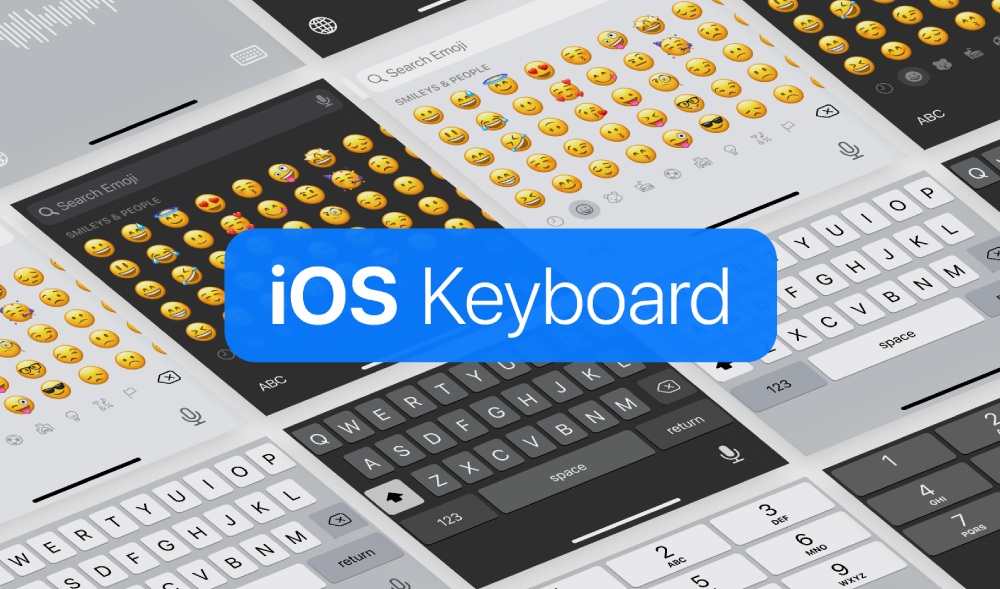
Download a free iOS keyboard UI Figma template, featuring a complete collection of iPhone and iPad keyboard layouts designed to match Apple’s native iOS experience. This resource is ideal for designers who need accurate keyboard mockups for mobile app design, UI prototyping, and interaction testing.
The template includes multiple keyboard variations, supports both light and dark mode, and comes with precise dimensions to ensure realistic and production-ready designs. Whether you’re building a messaging app, form-heavy interface, or system-level concept, this iOS keyboard Figma file helps you design faster and more accurately.
A Complete iOS Keyboard Reference for Designers
On mobile apps, keyboards play a crucial role in user experience—but they’re often overlooked or approximated with screenshots. This free Figma template solves that problem by providing fully editable iOS keyboard components, allowing designers to integrate keyboards directly into their mockups and prototypes.
The file includes an assorted list of keyboard layouts for both iPhone and iPad, making it easy to design for different screen sizes and use cases. Designers can quickly drop these keyboards into their frames to visualize how forms, chat interfaces, or input fields behave when the keyboard is active.
Light & Dark Mode Support
Modern iOS apps are expected to support both light mode and dark mode, and this template includes both variations out of the box. This makes it especially useful for testing contrast, readability, and overall UI balance across different system themes.
Designers can easily toggle between modes, customize colors if needed, or adapt the keyboards to match branded interfaces while keeping Apple’s native layout structure intact.
Accurate Dimensions & Realistic Mockups
One of the most valuable aspects of this resource is that it includes accurate keyboard dimensions, helping designers avoid spacing issues or unrealistic layouts. Using correct sizing is essential when designing input-heavy screens, especially for usability testing and developer handoff.
In addition to the keyboard components themselves, the file also includes mockups, making it easier to showcase designs in context or present concepts to clients and stakeholders.
What’s Included in This Free iOS keyboard UI Figma Template
This free iOS keyboard UI template includes everything you need for realistic mobile input design:
- Assorted iPhone and iPad keyboard layouts
- Support for light and dark mode
- Accurate keyboard dimensions
- Editable keyboard components
- Keyboard mockups for presentation and prototyping
- Clean, well-organized Figma file
All components are easy to customize and reuse across different projects.
Ideal For
This free Figma iOS keyboard template is perfect for:
- UI/UX designers working on iOS apps
- Product designers building mobile interfaces
- Designers creating chat, messaging, or form-based apps
- Prototyping and usability testing
- Portfolio and case study mockups
- Developers who need accurate UI references
It’s also a great learning resource for designers who want to better understand how iOS keyboards affect layout behavior and spacing in mobile design.
Built for Modern Figma Workflows
Designed natively in Figma, this template supports collaboration, quick iteration, and easy handoff. The clean layer structure ensures you can find, edit, and reuse components without friction. Whether you’re sketching ideas or preparing high-fidelity prototypes, this resource fits seamlessly into modern design workflows.
Overall, this free iOS Keyboard Figma template is a practical and time-saving resource for anyone designing mobile apps for Apple devices. By providing accurate, editable keyboard components for both iPhone and iPad, it helps ensure your designs look realistic, polished, and ready for real-world use.
Download Figma MockupReport missing link